
Video Locker
-
4.3
- 無料 価格
- 動画プレーヤー&エディタ カテゴリ
- Handy Apps 開発者
-
名前Video Locker
-
価格無料
-
カテゴリ動画プレーヤー&エディタ
-
評価4.3
-
開発者Handy Apps
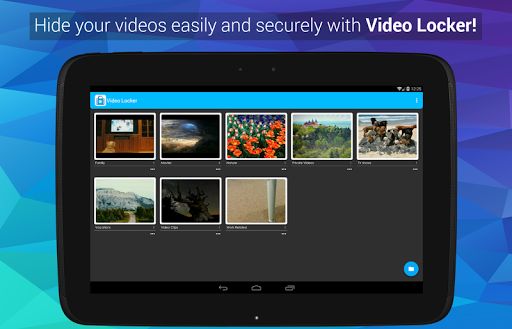
Keep videos hidden safe from prying eyes in Video Locker! - The ultimate secret gallery app to hide videos on your Android devices.
Sensitive videos from your Android video gallery can be kept safely locked away in a secure Video Locker accessible only via a secret PIN code.
Key features of Video Locker include:
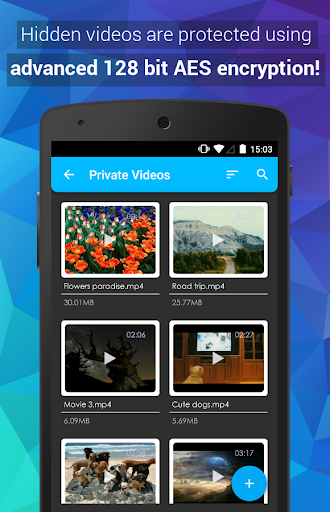
1) Encryption - hidden videos are not only moved to a secret location on your phone but are also encrypted using advanced 128 bit AES encryption. This means that even if someone manage to steal your SD card and copy the hidden video files, they will still be unable to view the locked videos.
2) Removed from recent app list - Video Locker App will not appear in 'recent apps' list
3) Lock on sleep - If you forgot to exit Video Locker, the app will lockout as soon as your device goes into sleep mode.
4) Folder level locking - lock individual hidden video albums. This allows you to show only 1 hidden video album without exposing the others.
5) Tablet optimized - Video Locker's UI has been designed with tablets in mind as well so as to provide the ultimate viewing pleasure on both Android smart phones and tablets
6) PIN recovery - With the optional PIN recovery feature, you won't lose your precious video files even if you forgot your PIN code. The app will email the PIN to you in the event you forgot Video Locker's PIN code.
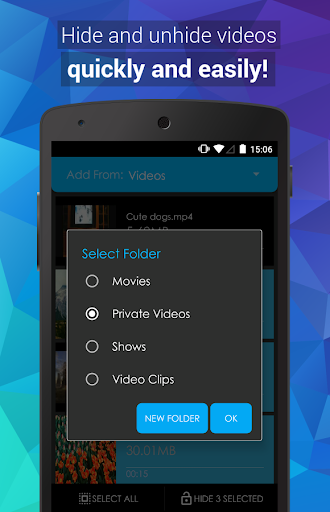
7) User friendly operation - Easily hide videos via default gallery or from within Video Locker itself.
8) Fast bulk hide - Keep safe dozens of videos in seconds!
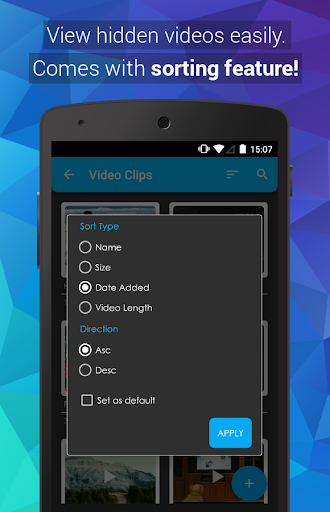
9) Un-hide videos easily - Un-hide videos just as easily as hiding them and you can decide where the un-hidden videos go.
Premium features:
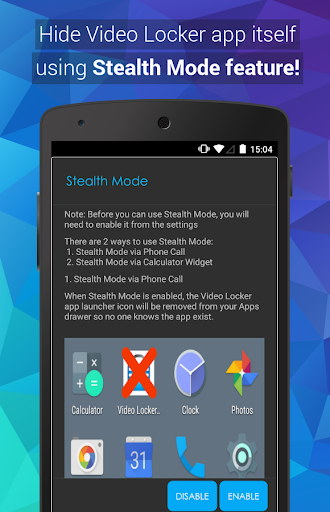
1) Stealth Mode - Hide the app itself! Video Locker App will disappear from the app drawer as if it never exist on your phone. Access to your private video vault can only be achieved via an innocent looking calculator widget.
2) Fingerprint log in
3) Get 2 apps for the price of 1! Upgrade either Video Locker or Photo Locker to get premium for both apps. Both apps must remain installed in the device to enjoy this promotion.
4)Ad-free viewing experience
Download Video Locker now!
Video Locker is brought to you by Handy Apps.
Connect with us on Facebook at: https://www.facebook.com/HandyAppsInc
--------
*Android 10 Stealth Mode users: Due to Google policy changes, icons can no longer hide in stealth mode for Android 10+. The Calculator(VL) widget will still work, and tapping on the icon only opens app settings, not the app itself. We are working on possible solutions currently.*
Notes to users:
- All videos are safely hidden in the device and not saved to any cloud program for user's privacy.
- App must not be moved to SD card.
- Do not delete .VL folder.
- Not recommended for devices on custom ROM
- Devices running on Android 4.4 and above have restricted application access to SD card.
Having issues with Video Locker? Check out the FAQ below for assistance!
https://www.handyappsforlife.com/photo-locker-video-locker-faqs

この質問は一番聞かれる質問です。そして、公式のGoogle Playストア以外からアプリをダウンロードする場合、この手続きはもっと複雑になるかもしれません。そのために、私たちは本サイトからダウンロードしたアプリのインストール方法について詳しくまとめました。このチュートリアルには詳細な操作方法はもちろん、役立つ写真も付きます。使い方は簡単で詳細なので、初心者でもすぐ操作できます。
本サイトからダウンロードされたアプリの安全性について心配するお方はたくさんいます。そして、私たちは本サイトからダウンロードされたアプリの安全性を保証できます。本サイトから提供するすべてのアプリはあなたのスマホのハードウェアやプライバシーに害を及ぼす可能性が一切ありません。ぜひ安心してください。
もちろんです。本サイトから提供するすべてのアプリは、100%無料でダウンロードできます。さらに、わざわざアカウントを作成する必要はありません。ダウンロードボタンをクリックするだけで完了です。
最近、さまざまな理由でログインできませんというメールをたくさん届きました。このような質問を答える前に、どのアカウントを参照しているかを知る必要があります。例えば、FacebookアカウントやYoutubeアカウントなど、アプリのアカウントについて話している場合、実にお手伝いことはできません。対応のカスタマーサービスに助けを求めるほうがおすすめです。
この質問は基本的に前の質問と非常に似ています。サードパーティアプリのサブスクリプションをキャンセルする場合は、カスタマーサービスにお問い合わせください。
この質問もサードパーティアプリのサブスクリプションをキャンセルする場合は、カスタマーサービスにお問い合わせください。私たちに助けを求めても、彼らに連絡する方法を提供する以外の方法もありません。 本サイトから退金を希望する場合には、我々のサービスが100%無料であることを再度指摘する必要があります。


