
写真の背景を変更
-
4.6
- 無料 価格
- 写真 カテゴリ
- Best Photo Effects 開発者
-
名前写真の背景を変更
-
価格無料
-
カテゴリ写真
-
バージョン3.6.2
-
評価4.6
-
開発者Best Photo Effects
How to erase background of my photo? How to change background of my photo? ?
You will find answers to these questions by installing this awesome photo app.
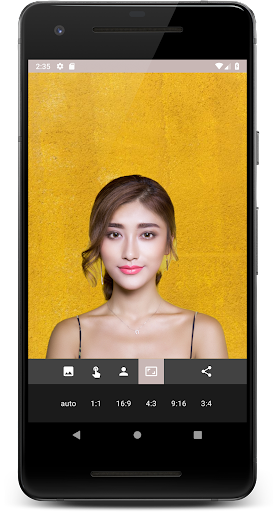
This app is an automatic background changer. You can cut out background from any photo and change the background of your photo.
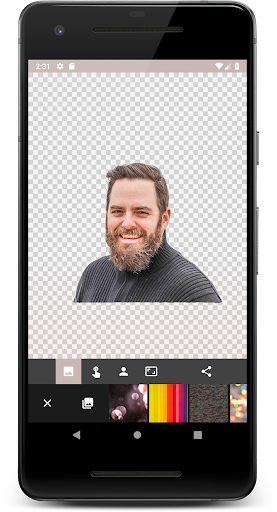
Background eraser can automatically remove background from photos or you can use eraser tool for photos to erase objects from photos by yourself.
This background eraser is very easy to use.
Why is this app better than thousands of others? ?
It is really automatic and uses neural network to automatically cut out everything except people/cats/dogs on the photo. In the most cases you don't have to use an eraser tool by yourself.
This auto photo background changer looks nice, very easy to use and very fast. You can replace background in just few seconds.
Features:
★ Automatic background eraser and remover. It can erase background from photo and remove unwanted objects from photos.
★ Save and share a photo without background.
★ Change picture background with a one of predefined images or replace background with your own picture.
★ You can make awesome collages very fast using this background image editor. For example, you can crop head on body or change photo background to some cool picture.
How to use the automatic background changer?
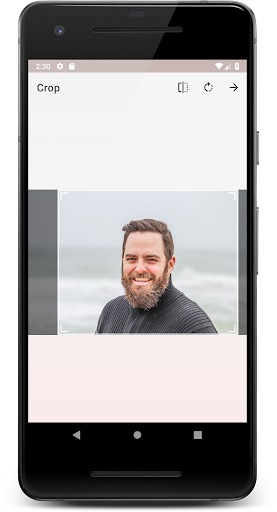
1. Choose a photo from your gallery.
2. Crop photo as much as possible to get a picture of better quality.
3. Wait for the magic to happen. If there are no people on the photo, the app can't do anything, but you can use an eraser tool to cut out photo. (Now it can also cut out background from photos of cats and dogs, not only people! ?)
4. Use an eraser tool to edit a photo and erase unwanted objects from photo.
5. Select any background that you want from gallery and change photo background.
6. Make a collage and share.
If you enjoy this photo background eraser, please, honestly rate "Automatic Background Changer" on Google Play and give us your review. ?
If you don’t like something, please, let us know about! We really appreciate your support!
Contact us in review section on Google Play or email: [email protected]
Thank you for using our app!



この質問は一番聞かれる質問です。そして、公式のGoogle Playストア以外からアプリをダウンロードする場合、この手続きはもっと複雑になるかもしれません。そのために、私たちは本サイトからダウンロードしたアプリのインストール方法について詳しくまとめました。このチュートリアルには詳細な操作方法はもちろん、役立つ写真も付きます。使い方は簡単で詳細なので、初心者でもすぐ操作できます。
本サイトからダウンロードされたアプリの安全性について心配するお方はたくさんいます。そして、私たちは本サイトからダウンロードされたアプリの安全性を保証できます。本サイトから提供するすべてのアプリはあなたのスマホのハードウェアやプライバシーに害を及ぼす可能性が一切ありません。ぜひ安心してください。
もちろんです。本サイトから提供するすべてのアプリは、100%無料でダウンロードできます。さらに、わざわざアカウントを作成する必要はありません。ダウンロードボタンをクリックするだけで完了です。
最近、さまざまな理由でログインできませんというメールをたくさん届きました。このような質問を答える前に、どのアカウントを参照しているかを知る必要があります。例えば、FacebookアカウントやYoutubeアカウントなど、アプリのアカウントについて話している場合、実にお手伝いことはできません。対応のカスタマーサービスに助けを求めるほうがおすすめです。
この質問は基本的に前の質問と非常に似ています。サードパーティアプリのサブスクリプションをキャンセルする場合は、カスタマーサービスにお問い合わせください。
この質問もサードパーティアプリのサブスクリプションをキャンセルする場合は、カスタマーサービスにお問い合わせください。私たちに助けを求めても、彼らに連絡する方法を提供する以外の方法もありません。 本サイトから退金を希望する場合には、我々のサービスが100%無料であることを再度指摘する必要があります。


